
 Crewmate
 DeepAgent
 MemeMint
 Safenest
 Tapvault
 Bitvm
Bitvm
The Org Chart Was the Missing Piece in AI Workforce Software
AI tools have flooded the market for two years. Most of them are a chat box with a different sticker on it. You ask, the model answers, you copy the answer somewhere it can actually do something. The model is smart, the workflow is broken.
Crewmate ships a different default. The base unit isn't a conversation it's an org chart. Owners and Managers are human. The agents below them are AI. The structure is the product.
Here's why that one design decision changes what AI workforce software can do.
What a chat box can't do
A chat surface has no concept of who's responsible for what. Every message is the same. There's no team. No supervision. No escalation. When the model writes a draft, the person on the other end has to remember to review it. When the model is asked to take an action, there's no second pair of eyes. When something goes wrong, there's no audit log of who approved what.
In a real company, an entry-level employee doesn't send a contract without their manager looking at it. They don't update the CRM without rules about what fields they're allowed to touch. They don't post on the company blog without an editor. The structure exists because the structure is how trust scales.
Chat boxes give you the entry-level employee. They don't give you the structure.
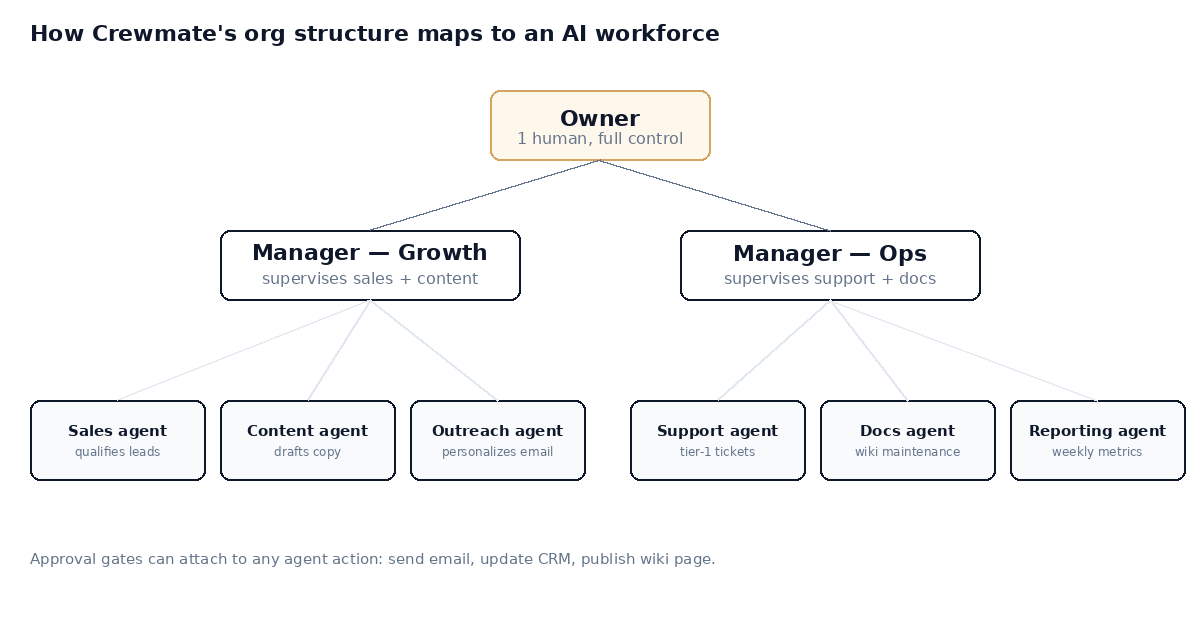
Owner supervises Managers. Managers supervise teams of AI workers. Every action can be gated by approval.
How the structure works
Every Crewmate workspace has one Owner. The Owner can promote any member to Manager. Managers run teams. Each team holds AI agents Sales, Support, Docs, whatever your business needs. Every workspace starts with a General team pre-created on signup, so you can start fast and reorganize later.
Agents have specialties. A Sales agent reads your pricing page, your CRM, your product docs, and knows how to qualify a lead. A Support agent reads your help center and your past tickets. A Docs agent maintains your internal wiki and proposes changes when processes shift. You don't build them from scratch you describe the role, point at the knowledge sources, and let the agent specialize.
Above them, the org chart provides what chat boxes lack: a place where supervision lives.
Why approval gates matter
Every agent action that touches the outside world can be put behind an approval gate. Sending an email. Updating a CRM record. Publishing a wiki edit. Deleting anything. The agent prepares the action. A human in the right team approves it. The action fires. The audit log records who approved what and when.
This sounds like friction. It is, for the first week. After that, you start to see which actions the agent gets right consistently and you remove the gates. The ones you keep are the ones that protect you. The ones you remove are the ones that wasted your manager's time. The trust builds because the structure lets it build.
The day this all clicks
A founder we talked to set up a Sales agent. The agent qualified a lead on a Tuesday afternoon and drafted a follow-up email. The draft was good, but a tiny detail in the prospect's industry was wrong they sold building materials, not building services. The manager caught it in the approval queue, edited two words, hit send. The lead replied positively the next morning.
That's the entire pitch. The agent did 95% of the work. The human did 5%. The wrong email never went out. The right one went out 30 seconds after a human read it. Multiply that by 200 leads a month and you understand why Crewmate doesn't look like a chat product.
Where to start
Most teams begin with one agent in one team Support or Sales. The General team is already there from signup. You add an agent, point it at your docs, set approval gates on the two or three actions you don't want it doing without supervision, and run it for two weeks. After two weeks, you'll know which gates to remove. After a month, you'll know which agent to add next.
That's how AI workforce becomes real. Not all at once, in a demo. Slowly, with structure.